The Truth About the Auvik: Pros, Cons, and Verdict
Introduction
The network operations landscape has shifted decisively toward SaaS-driven monitoring and management. Among the vendors that rose to prominence in that space, Auvik has become a frequent name in conversations about modern network observability. This article examines Auvik from an editorial, buyer-focused perspective: what it is, how it works in real-world settings, who benefits most, and where it may fall short. The goal is to give a practical picture for IT managers, managed service providers (MSPs), and technical buyers evaluating network monitoring platforms.
What Auvik Is (At a Glance)
Auvik is a cloud-delivered network monitoring and management platform that emphasizes automated discovery, topology visualization, device inventory, performance monitoring, and integrations for operational workflows. It is designed to reduce the time required to detect, diagnose, and remediate network issues. Auvik’s user experience centers on a visual topology map, streamlined alerting, and multi-tenant support — features that appeal particularly to MSPs and distributed enterprise environments.
How Auvik Works: Key Features and Architecture
Auvik deploys lightweight sensors (collectors) within a customer network to gather telemetry via SNMP, Syslog, NetFlow/sFlow (when available), API calls, and other protocols. The sensors send metadata and metrics to Auvik’s cloud backend for processing and visualization. This architecture enables several functional areas:
- Automated network discovery: Auvik scans subnets and builds an inventory of network devices and interfaces without manual templating.
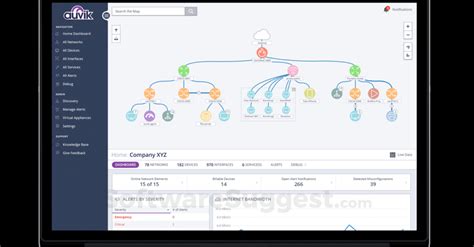
- Topology mapping: The platform renders device and link relationships into an interactive map that can be drilled into for device details and historical metrics.
- Performance monitoring: Interface throughput, latency, errors, and utilization metrics are collected and retained to support troubleshooting and capacity planning.
- Alerting and notifications: Alerts can be configured with thresholds, severity levels, and routing to email, ticketing systems, or integrated PSA/RMM tools.
- Configuration tracking & backups: For supported device families, the platform can archive configurations and highlight differences over time.
- Integrations and automation: APIs and prebuilt connectors allow integration with remote access tools, RMM/PSA platforms, and ITSM workflows.
Detailed Product Review and Analysis
This review focuses on the product experience and operational impact rather than marketing claims. The analysis looks at four practical dimensions: deployment & setup, visibility & troubleshooting, scalability & multi-tenancy, and operational economics.
Deployment and Setup
One of Auvik’s consistent strengths is the simplicity of initial setup. Installing a collector in a network segment or behind a firewall typically requires only a small VM or appliance and a few configuration steps. The automated discovery engine often finds routers, switches, firewalls, wireless controllers, and other IP-enabled infrastructure within minutes. For MSPs who onboard many client sites, the time-to-first-map is a meaningful productivity win.
On the flip side, some environments have strict egress restrictions or segmentation that require more coordination with network/security teams. Because Auvik is cloud-based, connectivity from the collector to the vendor’s backend must be allowed. Organizations with rigid compliance or data residency requirements should assess whether that deployment model aligns with policy.
Visibility and Troubleshooting
Auvik’s topology visualization is a standout feature in day-to-day troubleshooting. The ability to click through a map, inspect interface metrics, and jump to recent events shortens mean time to resolution (MTTR). In practical scenarios — for example, a retail chain experiencing intermittent WAN issues — engineers can quickly identify which branch links are saturated, which devices show increased CRC errors, and whether traffic patterns have shifted.
The platform’s historical charts and device inventories support root cause analysis and capacity planning. However, advanced packet-level analysis or deep application performance monitoring are outside its primary remit; organizations that need packet capture or application-level APM will use Auvik alongside other tooling.
Scalability and Multi-Tenancy
Auvik is purpose-built to support MSP workflows: multi-tenant accounts, role-based access, and client separation are built into the management plane. For an MSP juggling dozens or hundreds of customer networks, being able to jump between client views, apply templates, and centralize alerting is a compelling proposition. The architecture also scales well for distributed enterprises — thousands of device endpoints are a common deployment scale for mature customers.
Performance at scale depends in part on the data retention policies the buyer chooses. For long-term capacity planning, buyers should validate retention windows for different metric types and understand how historical data is queried when troubleshooting across many sites.
Discover deals on Electronics — updated daily.
View Offers →Operational Economics and Licensing
Auvik follows a subscription pricing model typical in SaaS network monitoring. Pricing variables commonly referenced by buyers include the number of devices, the number of sites, and optional add-ons (for example, advanced flow analysis or remote access modules). The recurring cost must be evaluated against the operational savings it produces — faster troubleshooting, fewer truck rolls, and centralized support for multiple sites.
Smaller IT teams and single-site small businesses may find the recurring cost higher than lightweight open-source alternatives; conversely, MSPs and mid-to-large enterprises that need consolidated visibility often achieve strong ROI by reducing on-site visits and shortening outage durations.
Real-World Use Cases
Understanding how Auvik is used in practice helps clarify where it fits in a technology stack.
- Managed Service Providers (MSPs): MSPs use Auvik to onboard new customers quickly, monitor multiple client networks from a single pane, and integrate alerts into PSA/RMM workflows to automate ticket creation and remediation steps.
- Retail and Branch Networks: Retail chains and organizations with distributed branches use topology maps and WAN performance metrics to detect branch link congestion, failing interfaces, or ISP outages, enabling remote triage before dispatching technicians.
- Campus IT and Education: Campus network teams use Auvik’s inventory and mapping to track device lifecycles, identify bandwidth-heavy users or ports, and plan upgrades for high-traffic segments.
- Compliance and Auditing: Teams preparing for audits rely on configuration backups and inventories to demonstrate device baselines and change history.
- Incident Response: During incidents, NOC teams use Auvik to correlate alerts, identify affected segments, and expedite rollback or reroute actions.
What Buyers Typically Care About
Buyers tend to evaluate network monitoring tools against practical criteria:
- Time to value: How quickly can the tool be deployed and provide actionable insights?
- Visibility depth: Does it show interfaces, flows, top talkers, and configuration changes?
- Integrations: Can it plug into ticketing and automation systems already in use?
- Scalability and multi-tenancy: Is the platform suited to support multiple customers or distributed sites?
- Cost and licensing model: How predictable and transparent are recurring costs?
- Security and data handling: Where is telemetry stored, and how does that align with compliance requirements?
Pros & Cons
- Pros
- Rapid automated discovery and clear topology maps reduce initial inventory effort.
- Cloud-hosted SaaS model simplifies management and upgrades for IT teams and MSPs.
- Strong multi-tenant capabilities and role-based access suitable for MSP workflows.
- Integrated alerting and device-level metrics shorten troubleshooting time and lower MTTR.
- APIs and integrations facilitate automation into PSA/RMM and ticketing systems.
- Cons
- Recurring subscription costs can be a barrier for very small businesses with limited budgets.
- Cloud architecture requires outbound connectivity from collectors; this can complicate deployment in tightly controlled networks.
- Some advanced features (flows, deep packet or per-application analysis) may require additional modules or external tools.
- Alert fatigue is possible if thresholds are not tuned; initial rule configuration can require effort.
How Auvik Compares to Alternatives
| Product | Deployment | Best for | Strengths | Limitations |
|---|---|---|---|---|
| Auvik | Cloud collectors + SaaS backend | MSPs, distributed enterprises | Automated discovery, topology, multi-tenant UI, integrations | Subscription costs; requires collector connectivity |
| SolarWinds Network Performance Monitor (NPM) | On-premises or cloud-hosted | Large enterprises preferring self-hosting | Deep feature set, rich reporting, large ecosystem | Complex deployment; heavier maintenance burden |
| PRTG (Paessler) | On-premises or hosted | SMBs needing flexible sensors and pricing | Flexible sensor-based licensing; strong sensor variety | UI can be overwhelming; scaling needs careful planning |
| Datadog Network Monitoring | SaaS | Organizations using Datadog for infrastructure/app monitoring | Integrated with application and infrastructure telemetry | Pricing complexity; can be costly when many data streams are used |
Buying Guide: How to Decide if Auvik Is Right
Choosing the right network monitoring and management platform depends on a mix of technical and business factors. The following checklist helps buyers evaluate Auvik against their needs.
1. Clarify the Scope of Monitoring Needs
Decide whether the need is primarily for device/inventory visibility, interface performance metrics, flow-level analysis, configuration backups, or a combination. Auvik excels at device discovery, topology, and interface-level troubleshooting. If deep application performance or packet capture is required, plan on complementary tooling.
2. Consider the Deployment Model and Compliance Constraints
Because Auvik uses collectors that send telemetry to a cloud backend, check whether organizational policies allow that flow of metadata. For regulated industries, confirm encryption, data retention, and geographic considerations with the vendor.
3. Evaluate Multi-Tenancy and Role Management
If supporting multiple customers or a large distributed estate, validate multi-tenant segregation, RBAC, and audit logging. For MSPs, ask about client onboarding workflows, template sharing, and how account separation is implemented.
4. Test Integrations and Workflow Automation
Buyers should verify integrations with PSA, RMM, ITSM, and remote access tools used in their environment. Auvik’s value multiplies when alerts automatically generate tickets or feed into automation pipelines that trigger remediation playbooks.
5. Proof of Concept and Pilot
Run a pilot across representative sites before committing to a full subscription. Measure time-to-discovery, map accuracy, alert relevance, and the administrative overhead of tuning thresholds. Use the pilot to estimate the reduction in on-site visits and expected operational savings.
Find top-rated Electronics products at great prices.
Browse Now →6. Understand Pricing and Total Cost of Ownership (TCO)
Gather clarity on license units (devices, interfaces, sites), contract terms, and add-ons. Model the TCO over three years, factoring in potential headcount savings, reduced downtime costs, and ticket volume reduction. Compare that TCO to alternatives and internal build options.
7. Plan for Alert Tuning and Onboarding
Expect an initial period of alert tuning. Poorly tuned alerts cause fatigue and reduce confidence. Assign a small team to fine-tune threshold definitions, set up filtering rules, and create runbooks that map alerts to remediation steps during the onboarding phase.
Implementation Tips and Best Practices
- Start small with a pilot covering core network hubs and a few branch sites; expand once confidence grows.
- Document which devices will be inventoried and ensure SNMP/community strings, NetFlow endpoints, and API credentials are managed securely.
- Integrate alerts into an existing ticketing workflow to measure ticket reduction and MTTR improvements objectively.
- Use topology maps in runbooks for NOC onboarding: new engineers should be able to follow the map to investigate common incidents.
- Establish retention and reporting policies for historical metrics needed for capacity planning and audits.
Common Concerns and How to Address Them
Potential buyers often voice a few recurring concerns; here is pragmatic advice on addressing them.
“Will the cloud model expose sensitive data?”
The collectors transmit telemetry about device states and metrics, not full packet payloads. Nevertheless, buyers should request documentation on encryption in transit/at rest, data handling, and contract clauses that address data residency and breach notifications.
“How will Auvik scale with many clients/sites?”
Testing at representative scale during a pilot helps expose edge cases. Confirm with vendor support on recommended collector placement, data retention limits, and any performance tuning required for very large estates.
“Can it replace existing tools?”
Auvik can replace inventory and topology functions and reduce reliance on some legacy monitoring practices, but it rarely replaces specialized APM or packet-capture tools. Treat it as a central network observability layer that complements other systems.
Conclusion
Auvik provides a compelling mix of automated discovery, topology visualization, and multi-tenant management that delivers practical value for MSPs and distributed organizations. Its strengths are fastest time-to-visibility, an intuitive troubleshooting experience, and integrations that improve operational workflows. The primary trade-offs are a recurring subscription cost and the need to accept a cloud-based telemetry model.
For buyers who need consolidated network visibility across many sites and want to reduce on-site troubleshooting and MTTR, Auvik is a strong candidate. For very small single-site operations or organizations that require exclusively on-premises hosting for telemetry, alternatives that offer self-hosting or a different pricing model may be a better fit. Ultimately, the right choice depends on deployment constraints, required depth of monitoring, and how the vendor’s licensing aligns with expected operational savings. A pilot deployment is the most reliable path to validate whether Auvik will deliver the promised value in a specific environment.